This outcome counts for 30 percent of your overall study score.
![[30 - SAT/Problem Solving Methodology]]
### Unit 3: Area of Study 2 – Software development: analysis and design
The first part of the SAT requires students to identify a problem, need or opportunity that can be developed as a software solution. Students may reach out to friends, relatives, local businesses or community groups to determine the problem, need or opportunity that requires a solution. Doing this provides them with an authentic client from whom to seek feedback and clarification throughout the process.
Regardless of how the teacher plans to deliver the learning program for Unit 3 Outcome 2, students should be informed of the structure of the SAT as early in the school year as possible. The purpose of doing so is that students can spend time finding an authentic problem, need or opportunity to focus on for their assessment.
Teachers should not provide individual students or classes with needs or opportunities; students must generate their needs or opportunities themselves.
At this stage, students should be starting to document their thinking to ensure that they have thought the entire SAT process through.
Teachers should establish and communicate a school-based process whereby students discuss their SAT idea/s with the teacher. The purpose of this process is to:
- ensure that the software solution can be feasibly completed within the timeframe available
- ensure that the scope of the proposed software solution is feasible in relation to the student’s demonstrated programming skills.
The teacher may choose to engage a colleague, learning area leader, VCE coordinator, deputy/assistant principal in the process if they choose (for purposes of transparency and fairness).
#### Solution brief
Once endorsed to proceed, students are then required to prepare a brief for their teacher that outlines the proposed direction they wish to take in relation to their SAT across Unit 3 Outcome 2 and Unit 4 Outcome 1. The following content should be included in the brief:
- An explanation of the problem, need or opportunity, and how the proposed software solution will aim to address the situation
- A brief description of the intended users or clients
- The programming language(s) to be used in the development of the software solution*
- A brief description of how the solution will use relevant features of a programming language from the software tools and functions and outcome-specific requirements document.
*Note: If the programming language(s) differs from the language(s) being used for the learning and assessment taking place as part of Unit 3 Outcome 1, the teacher should confirm that the student is proficient in the language before approving the focus of the SAT.
## Project Management
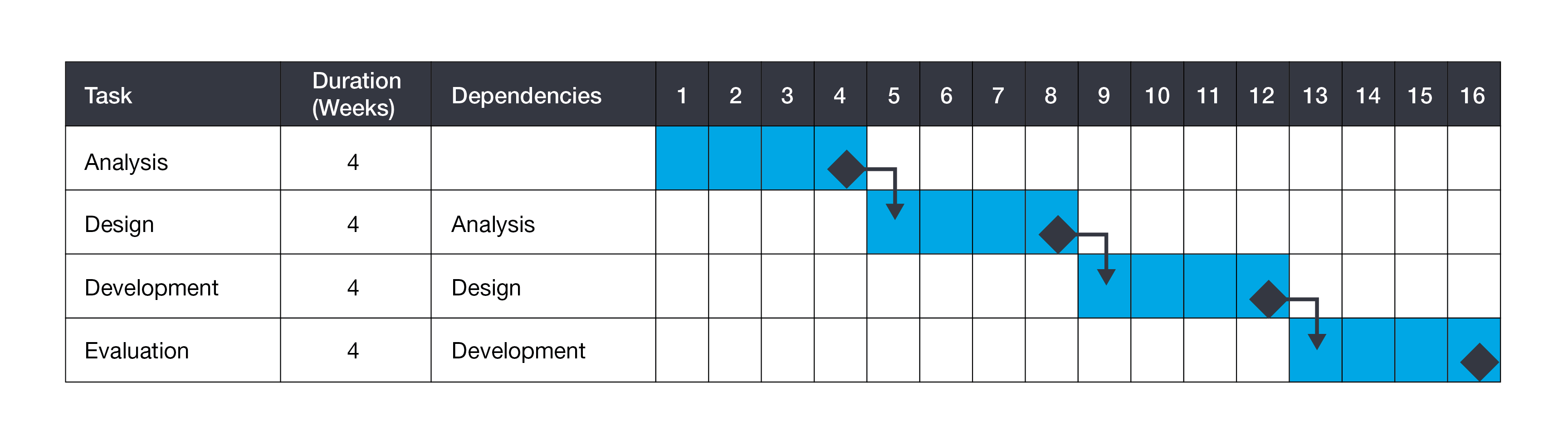
Students will produce a project plan (Gantt chart) that outlines the tasks, sequencing, time allocation, dependencies, milestones and the critical path. They will follow the project plan to develop their software solution to their identified need or opportunity. The project plan takes into consideration all stages and activities of the problem-solving methodology covered in Unit 3 Outcome 2 and Unit 4 Outcome 1.
Once the project plan has been developed it will be monitored and modified throughout the entire project. Students do not have to use dedicated project-management software in the development of their project plan.
Below is a sample of a project plan.
## Analysis Stage
The analysis stage of the problem-solving methodology requires students to:
- collect and analyse data
- use analytical tools to depict relationships between users, data and systems
- produce a software requirements specification.
#### Data collection
Students are required to collect data that will inform the analysis of their need or opportunity. A range of data collection techniques should be used, including interviews, observation, reports and surveys. The data collected must provide students with sufficient information to determine requirements, constraints and scope, user requirements and the proposed technical environment that the solution will operate within.
#### Analytical tools
Students use [[analytical tools]] and techniques to diagrammatically depict the relationships between data, users and the digital systems that will involve the software solution.
Analytical tools include [[Context Diagram (level 0)|context diagrams]] (Level 0), [[Data Flow Diagram (DFD)]] (Level 1) and [[Use Case Diagram (UCD)|use case diagrams]]. Students should ensure that their diagrams are consistent with their data collection in relation to the current system or manual processes. The analytical tools produced should be included in the software requirements specification.
Below are some simple representations of a context diagram, data flow diagram and use case diagram.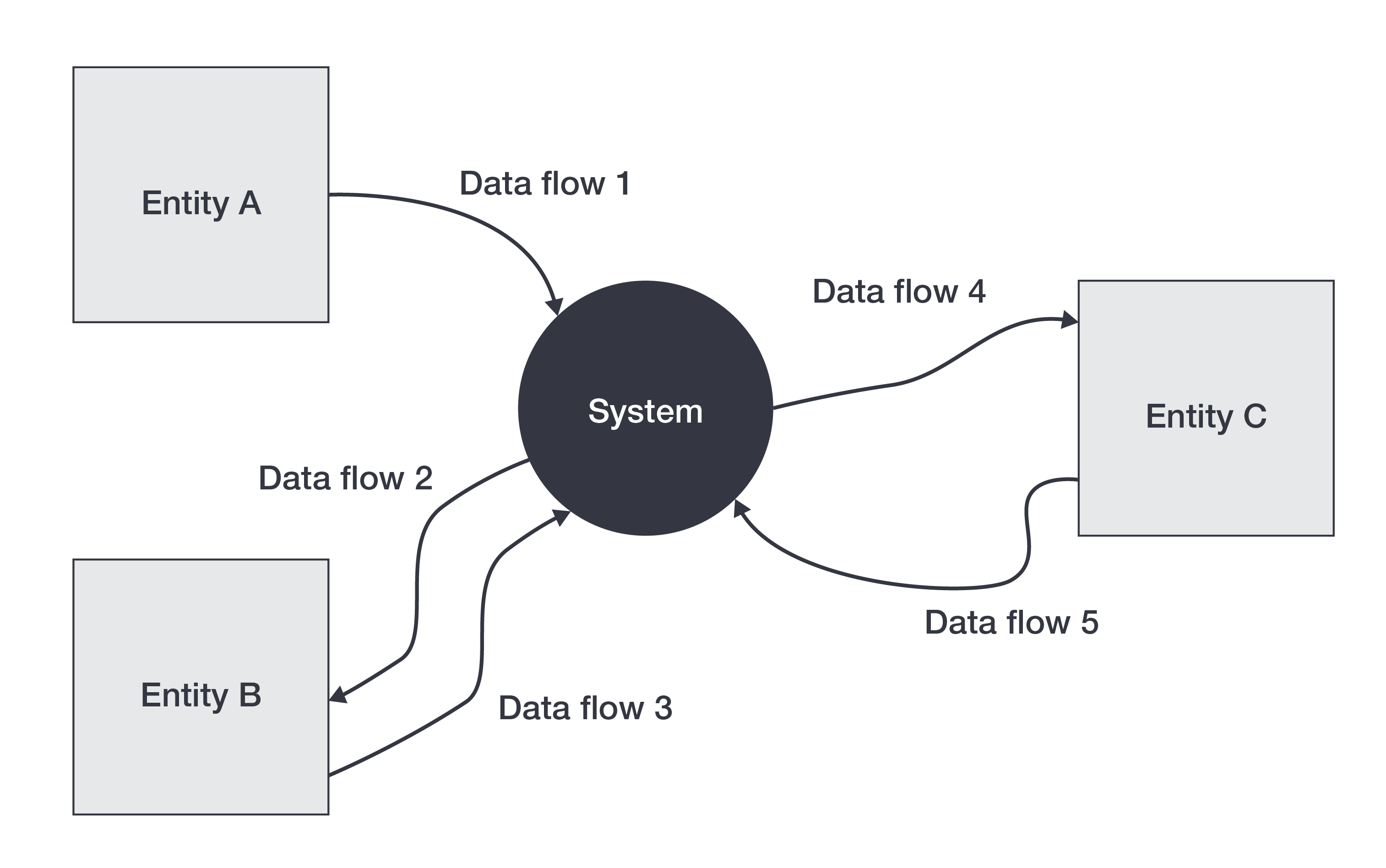
Sample Context Diagram
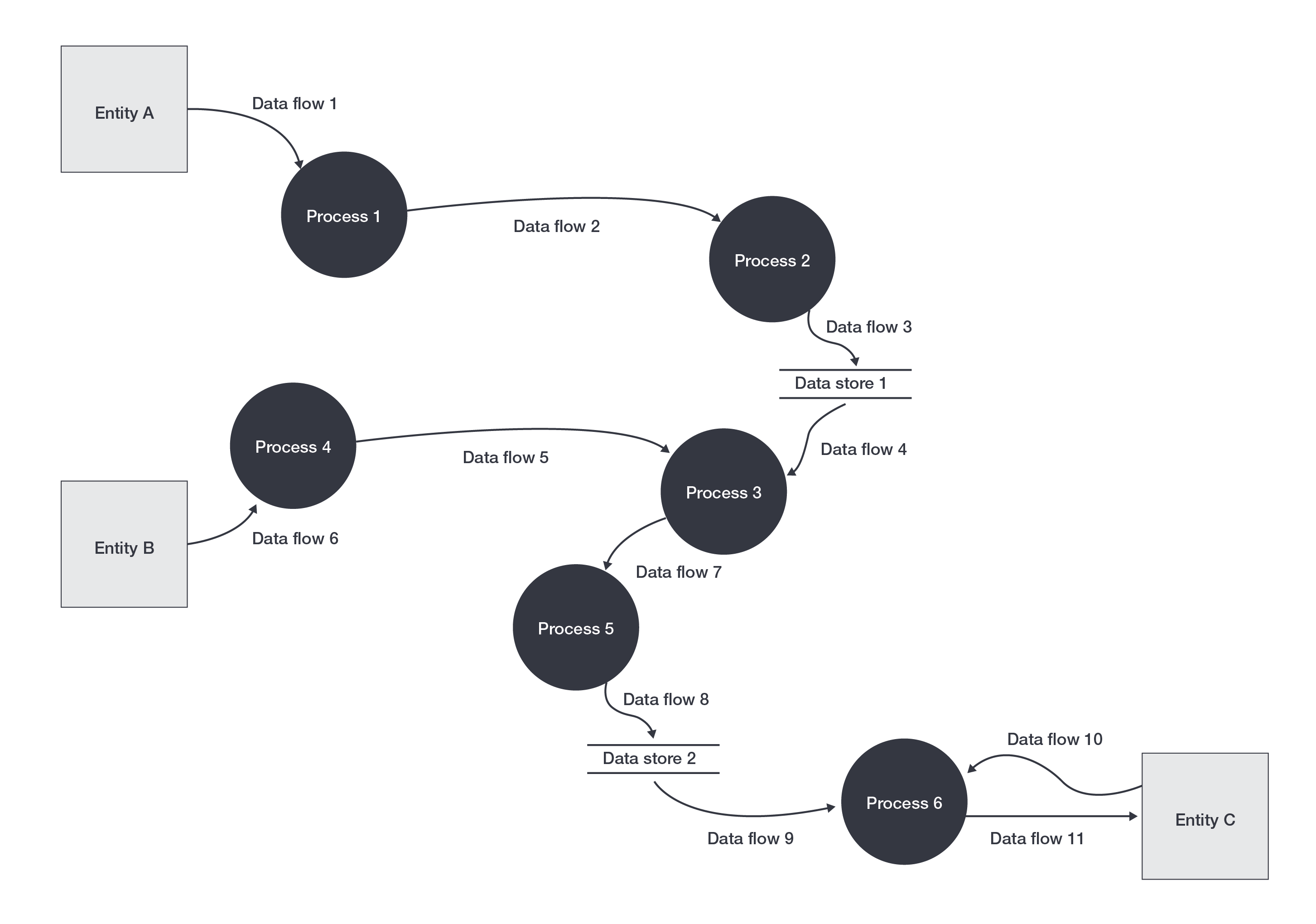
Sample DFD Diagram

Sample Use Case diagram
## Software requirements specification
A software requirements specification (SRS) document is then developed by students to clearly outline the proposed software solution to their identified problem, need or opportunity. The SRS is a formal document that details the purpose of the software solution and contains information that will be used to support the design of the software solution in Unit 3 Outcome 2, and the development of the software solution in Unit 4 Outcome 1.
The presentation of the SRS should include the following content:
- the identified problem, need or opportunity
- functional requirements
- non-functional requirements
- constraints
- scope
- user characteristics (general characteristics of the proposed users for the software solution)
- technical environment (description of the environment in which the software solution will operate)
- analytical tools depicting existing processes and systems
- context diagrams
- data flow diagrams
- use case diagrams.
## Design Stage
The design stage of the problem-solving methodology requires students to:
- generate a range of design ideas
- develop evaluation criteria
- develop and justify detailed designs.
#### Design ideas
Students generate and document a range of design ideas for their proposed software solution. These design ideas should be broad in nature, and consider both the functionality and appearance of the proposed solution. Students may consider the user experience and design principles that influence the design on their software solution within their design ideas. Examples of design ideas may include mood boards, brainstorms, mind maps, sketches and the use of annotations. At this point of the design stage, teachers should encourage students to seek feedback on their design ideas from their client or potential users.
#### Evaluation criteria
Students are required to develop criteria that will be used to evaluate their design ideas and, in Unit 4 Outcome 1, the software solution. Evaluation criteria for design ideas should support the student in considering how each of the design ideas link to the requirements outlined in the SRS and the proposed software solution. Evaluation criteria for the software solution should consider whether the requirements outlined in the SRS were met and the efficiency and effectiveness of the software solution.
#### Detailed designs
After receiving feedback from the client or potential users and evaluating the design ideas against the criteria, students develop their design ideas into a detailed design for the proposed software solution. The detailed designs should be representative of how they intend the proposed software solution will function and appear. When generating the detailed designs, students should also incorporate characteristics of user experience and design principles that influence appearance and functionality. Examples of detailed designs that may be included are data dictionaries, mock-ups (with explanations and justifications), object descriptions, IPO charts, and pseudocode. Feedback from the client may again be sought by students at this point.
Below is an example of the process for ideating and developing detailed designs.![[design.jpg]]
## Managing the project throughout Unit 3
The activities in this area of study need to be managed by the student as part of their project plan, which requires monitoring their progress in order to remain on track with meeting all the identified milestones throughout the SAT.